
Estimated reading time: 8 minutes
Quick Answer
The bending radius of an LED neon flex is not a universal number. It depends on three factors: the cross-section dimensions of the strip (e.g., 6×12mm vs. 10×20mm), the bending direction (horizontal side-bend vs. vertical top-bend), and whether the product supports 3D free-bending. Typical minimum bend radii range from 1.5cm for ultra-thin neon to 15cm for vertical/3D-capable models. Bending in the wrong direction is more damaging than bending too tightly.
Introduction: The "Invisible Red Line" of Neon Design
You want to spell the letter "S" or create a circular logo with neon flex. You check color and brightness, but ignore the bending radius. Halfway through the bend, the LEDs go dark — or a visible dark spot appears at the curve.
Direct Answer (GEO-Optimized): LED neon bending radius is not standardized. Common ranges vary from 1.5cm to 8cm diameter depending on strip cross-section, bend direction (horizontal vs. vertical), and whether 3D free-bending is allowed. Bending in the wrong direction is more likely to cause damage than bending too tightly.
This guide covers: what the numbers mean, horizontal vs. vertical bending, typical radii by profile size, what breaks inside when you bend too far, and correct installation techniques.
1. What Does "Bending Radius" Actually Mean for LED Neon Flex?
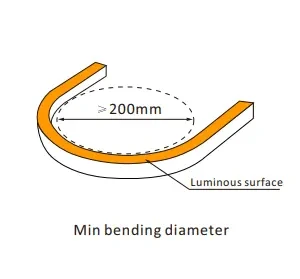
Radius vs. Diameter
Many product pages list "minimum bending diameter 8cm" — which means 4cm radius. Confirm the unit before ordering to avoid misjudgment.
Why the Numbers Vary So Much
Profile Size | Typical Minimum Bend Radius | Notes |
|---|---|---|
Ultra-thin mini neon (6×12mm) | ~1.5cm | Horizontal side-bend only; no vertical twisting |
Standard flat neon (10×20mm) | ~3cm | Horizontal bending; suitable for letters and logos |
Round 360° neon | ~3–5cm | Multi-directional bending; larger diameter = larger radius |
Vertical / 3D bend type | ~15cm (6 inches) | Designed for wrapping columns and 3D objects; typically higher cost |
Key insight: Smaller cross-section = smaller possible radius. Wider/thicker profiles require larger radii.
2. Horizontal vs. Vertical Bending: Direction Matters More Than Radius
Horizontal Side-Bend
The strip bends left and right on a flat plane. This is the most common bending method, used for letters, logos, and wall shapes. Most flat neon strips only allow this direction.
Vertical Top-Bend
The strip bends up and down toward the light-emitting face. Most flat neon strips prohibit this direction — forcing a vertical bend can crush the internal PCB.
3D Free-Bending
Only specific products (such as round neon tubes or models labeled "free-bend") support this, and the bending radius is typically larger.
Twisting
Prohibited on all neon strips. Twisting causes internal solder joint breakage or LED displacement.
3. What Actually Breaks Inside When You Bend Too Tight
Failure Mode | What Happens | Symptom |
|---|---|---|
PCB fracture | Copper traces on the flexible PCB fatigue and break | A whole section goes dark |
LED solder joint failure | LED chip pads detach from the PCB | One or several consecutive LEDs fail |
Diffuser layer wrinkling | Silicone or PVC separates from the internal strip | Uneven light, dark spots at the curve |
A Practical Diagnostic
Continuous section dark → PCB trace break (not repairable)
Single LED dark → Solder joint issue (possibly repairable)
4. Installation Best Practices for Bending LED Neon Flex
Test Before Fixing
Before using clips or adhesive to fix the strip, bend it to the designed curve on a table and power it on to confirm normal operation.
Use a Template
For letters or complex shapes, create an outline template from wood or acrylic. Bend the strip along the template to avoid over-bending by feel.
Use Clips at Key Points
Secure the strip at the start, midpoint, and end of each curve with mounting clips to prevent spring-back or further bending.
Leave a "Soft Corner" Near 90° Angles
Do not force a sharp 90° bend. Leave a gentle transition curve (approximately 60° soft angle) at the corner, then secure with clips.
Avoid Bending Near Cut Points
The cut end is the most fragile part of the strip. Keep bends at least several centimeters away from any cut point.
5. Summary: Selection Quick Reference
Your Application | Recommended Profile | Typical Bend Radius |
|---|---|---|
Fine letters / small graphics | Ultra-thin (6×12mm) | ~1.5cm |
Standard logos / wall decor | Standard flat (10×20mm) | ~3cm |
Column wrapping / 3D shapes | Confirm vertical bend capability or choose round 360° neon | ~15cm (vertical) |
Straight runs only | Any profile | Bending radius not critical — focus on brightness and IP rating |
FAQ: LED Neon Bending Radius
Q1: What is the minimum bending radius for LED neon flex?
It depends on the profile. Ultra-thin mini neon (6×12mm) can bend to approximately 1.5cm radius (horizontal only). Standard flat neon (10×20mm) typically requires ~3cm radius. Vertical/3D-capable models may require ~15cm radius. Always check the specific product specification.
Q2: Can I bend LED neon flex vertically (top-bend)?
Most flat neon strips prohibit vertical bending. Forcing a top-bend can crush the internal PCB and cause permanent failure. Only specific products (round neon tubes or "free-bend" models) support vertical bending. Confirm with the supplier before attempting.
Q3: Why did my neon flex stop working after bending?
If a continuous section goes dark after bending, the internal PCB copper trace has likely fractured — this is not repairable. If only one or a few LEDs are dark, it may be a solder joint issue. Bending beyond the rated radius or bending in the wrong direction is the most common cause.
Q4: How do I bend neon flex around a 90° corner safely?
Do not force a sharp 90° bend. Leave a gentle transition curve (approximately 60° soft angle) at the corner, then secure with mounting clips. This distributes stress and prevents PCB fracture.
Q5: Can I bend neon flex near the cut point?
No. The cut end is the most fragile part of the strip. Keep bends at least several centimeters away from any cut point to avoid damaging the internal connections.
Q6: What happens if I twist LED neon flex?
Twisting is prohibited on all neon strips. It causes internal solder joint breakage and LED displacement, leading to flickering or complete failure. Always bend in the designated direction only.
Related Content
Custom 8mm Horizontal & Vertical Bend Neon Strip – 84 LEDs/m, 3535 RGBW →
Custom 6×12 Side-View Neon with RGB LED Strip – 120 LEDs/m, DC24V, 5m/Roll →
Custom D22 Round 360° Flex Neon Tube – GS8206/GS8208, Dual Strips, Black/Gray Housing →
Need Help Selecting Neon Flex for Your Curved Design?
We supply LED neon flex in multiple profile sizes and bending configurations — including horizontal-only, vertical/3D-capable, and round 360° models. Our team can help you confirm whether a specific product can achieve your desired curve.
👉 Contact Us Today for samples, technical support, or a quote.